








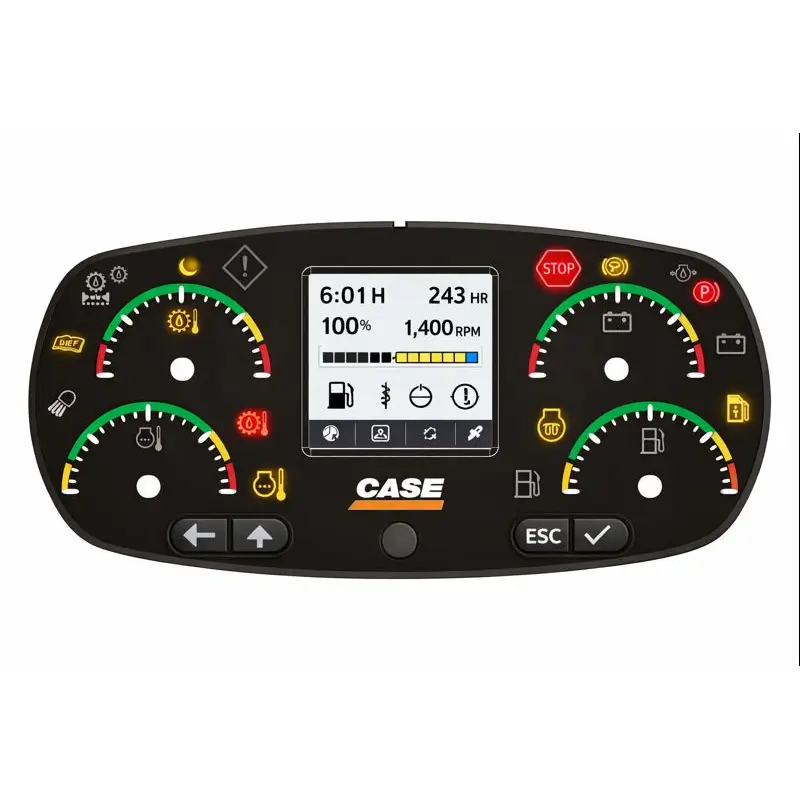

The manual provides a complete navigation reference for the Advanced Instrument Cluster (AIC) used in CASE M-Series dozers (650M – 2050M).
It explains how the LCD interface communicates with the Universal Control Module (UCM) and Engine Control Module (ECM) through the CAN-BUS network to display machine status, errors, and performance metrics.
Key Functions Explained:
-
Main Display Overview: Engine RPM, fuel level, DEF level, temperature, and system icons
-
Diagnostics Menu: Active and stored fault retrieval, code acknowledgment, and reset routine
-
Settings Menu: Language, units, brightness, auto-shutdown, and display contrast adjustments
-
Service Menu: Joystick calibration, brake release (tow mode), hydraulic fan reversal interval, and regen control
-
Regeneration and SCR Logic: Lamp meanings, operator prompts, and inducement levels
-
Event Recording: Timestamps and machine operating hours at each fault occurrence
With step-by-step screen illustrations and flow diagrams, the manual enables technicians to efficiently navigate and configure AIC menus, perform machine diagnostics, and ensure compliance with Tier 4 emission standards.
Coverage
-
General Overview
-
Advanced Instrument Cluster introduction
-
Display screen layout and control logic
-
Keypad button functions (UP, DOWN, ENTER, ESC)
-
-
Menu Navigation
-
Main menu → Settings → Diagnostics → Service
-
Engine and transmission data access
-
Operating hours and event counters
-
-
Diagnostics and Fault Codes
-
Retrieving active and stored faults
-
Clearing and acknowledging faults
-
Lamp logic: Yellow = Warning, Red = Shutdown
-
-
Service Functions
-
Regeneration enable/inhibit
-
Hydraulic fan reverse calibration
-
Auto Park Brake configuration
-
Joystick calibration sequence
-
-
System Configuration
-
Password entry for protected menus
-
Display brightness and units setup
-
Language and contrast settings
-
-
Emission System Integration
-
SCR/DPF status display and inducement messages
-
DEF level gauge and quality sensor status
-
Manual regeneration initiation
-
-
Maintenance & Event Records
-
Data logging and event history
-
ECM and UCM interface diagram
-
Delivery
The download link will be sent to your email instantly after payment.

Reviews
Clear filtersThere are no reviews yet.