






Overview
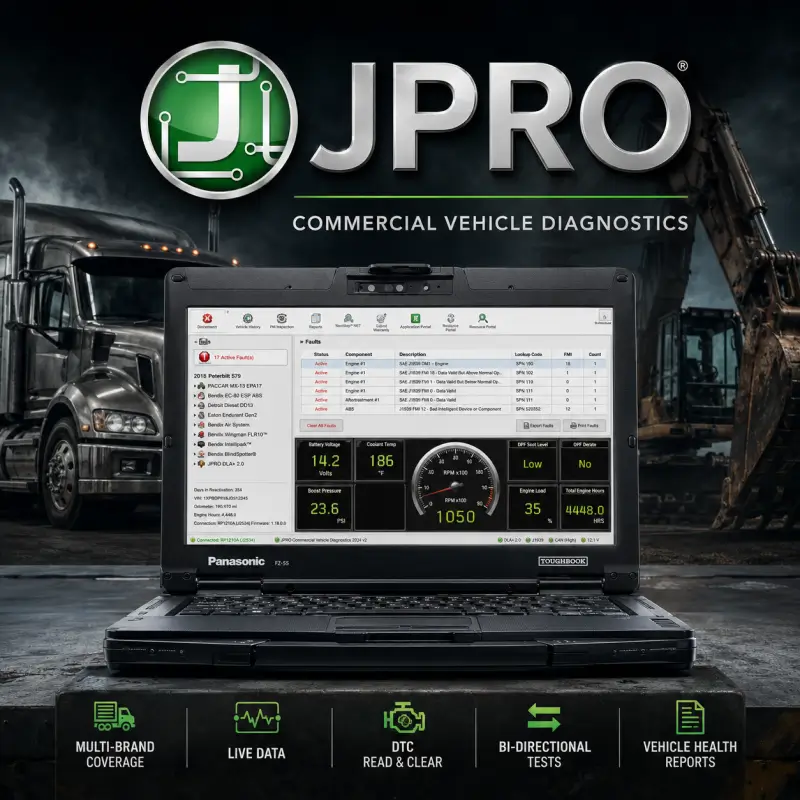
Gain complete all-makes, all-models diagnostic and troubleshooting capability across your commercial fleet with JPRO Professional Diagnostic Software.
Designed for commercial truck repair shops, fleet maintenance facilities, and heavy-duty technicians, JPRO combines vehicle health reporting, bi-directional testing, fault code diagnostics, and guided troubleshooting in one application.
Instead of switching between multiple OEM diagnostic programs, JPRO can simultaneously scan onboard electronic control units including:
- Engine
- Transmission
- ABS / Braking Systems
- Body Controllers
- Aftertreatment Systems
- Additional vehicle ECUs
Free professional remote installation service is included via AnyDesk or UltraViewer.
Supported Truck Brands & Component Manufacturers
Heavy-Duty Engine Coverage — Class 7–8
- Cummins: ISB, ISC, ISL, ISM, ISX, X15, B6.7, L9
- Detroit Diesel / Mercedes-Benz: DD13, DD15, DD16, MBE 900, MBE 4000
- PACCAR: MX-11, MX-13, PX-7, PX-9
- Mack & Volvo: D11, D13, D16, MP7, MP8, MP10
- International / Navistar: MaxxForce 7, 9, 10, 11, 13, N9, N10, N13
- Caterpillar: C7, C9, C12, C13, C15, C18 on-highway engines
Medium-Duty Coverage — Class 3–6
- Ford: F-250 through F-750, E-Series, Transit with Power Stroke engines
- GM / Chevrolet: Silverado 2500–5500, Express, Kodiak with Duramax engines
- Isuzu & Hino: N-Series, F-Series, Hino 155–338
- Mercedes-Benz Sprinter: 2.1L and 3.0L OM642 / OM651 engines
Transmission & ABS Systems
- Transmissions: Allison, Eaton Fuller, Detroit DT12, Volvo I-Shift, Mack mDRIVE, ZF
- Brakes & ABS: Bendix, WABCO, Haldex, Wabash
Bi-Directional Controls & Advanced Diagnostics
Aftertreatment Diagnostics
- Forced DPF stationary regeneration
- DEF pressure system testing
- SCR dosing tests
- Aftertreatment fault diagnosis
Engine Testing
- Interactive cylinder cut-out tests
- Injector troubleshooting
- EGR function tests
- VGT monitor tests
- Compression tests
ABS & System Actuation
- ABS lamp testing
- Wheel-speed monitoring
- Component activation and system tests
Parameter Adjustments
- Road speed limit settings
- Cruise control speed settings
- Idle shutdown timer adjustments
- Supported Mack, Volvo, and Cummins parameter changes
Maintenance & Reset Functions
- Oil life reset
- Clear active and stored fault codes
- Reset supported adaptation values
- Additional maintenance reset functions
Hardware & Interface Compatibility
JPRO supports standard RP1210 A/B/C compliant heavy-duty vehicle data link adapters, including:
- Noregon DLA+ 2.0 / DLA+ 3.0 — USB and Wireless
- NEXIQ USB-Link 2 / USB-Link 3
- DG Technologies DPA5
- FCAR interfaces
- Autel MaxiSYS VCI
- Other compatible RP1210 adapters
Supported Vehicle Connections
- 9-Pin Deutsch
- 6-Pin Deutsch
- OBDII connectors
Minimum PC Requirements
- Operating System: Windows 10 or Windows 11, 64-bit
- Processor: Intel Core i5 / AMD Ryzen 5 or higher
- RAM: 8 GB minimum
- Storage: 50 GB free SSD space
Free Remote Installation Included
Avoid driver issues, incorrect configuration, and RP1210 communication problems. Our technical team handles the installation and setup remotely.
- Instant Download
Receive the required download links after checkout. - Complete Remote Setup
Our technician connects through AnyDesk or UltraViewer and configures JPRO, required drivers, and compatible RP1210 adapters. - Interface Configuration
Your vehicle communication interface and RP1210 settings are configured correctly. - Connection Verification
We verify the software and hardware configuration to ensure the system is ready for diagnostic use.
100% Risk-Free Guarantee: If our team cannot successfully set up the software on your compatible PC, you receive a full refund.
Frequently Asked Questions
Q: Do I still need proprietary OEM diagnostic software if I have JPRO?
A: JPRO covers a wide range of everyday commercial vehicle diagnostics, troubleshooting, vehicle health reporting, and bi-directional maintenance functions across multiple truck manufacturers from one interface. Some manufacturer-specific programming or specialized functions may still require OEM software.
Q: Can JPRO perform DPF forced regenerations?
A: Yes. JPRO supports bi-directional forced DPF regeneration on compatible Cummins, Detroit, PACCAR, International, Volvo, Mack, and other supported engine platforms.
Q: Does JPRO work with NEXIQ USB-Link 2?
A: Yes. JPRO supports RP1210-compatible adapters including NEXIQ USB-Link 2, USB-Link 3, and Noregon DLA+ interfaces.
Q: Is remote installation included with my purchase?
A: Yes. Professional remote installation and configuration via AnyDesk or UltraViewer is included.
Compatibility Requirements
- Operating System: Windows 10/11
- Hardware: Requires a diagnostic adapter (e.g., Noregon DLA+ 2.0, Nexiq USB Link, or similar)
| Full JPRO Coverage | |
|---|---|
| Manufacturer | Supported Models |
| Freightliner | Cascadia, Columbia, Coronado, M2, FL-Series |
| Volvo | VNL, VNM, VNR, VAH, VHD |
| Mack | Anthem, Granite, Pinnacle, LR, TerraPro |
| Kenworth | T680, T880, W900, T800, T370 |
| Peterbilt | 579, 389, 567, 520, 365 |
| International | LT, RH, LoneStar, ProStar, Durastar, WorkStar |
| Western Star | 4700, 4900, 5700XE, 6900 |
| Sterling | Acterra, A-Line, L-Line |
| Ford | F-650, F-750, F-Series Super Duty |
| Chevrolet | Kodiak, Silverado 4500HD, Silverado 5500HD, Silverado 6500HD |
| GMC | TopKick, Sierra 4500HD, Sierra 5500HD, Sierra 6500HD |
| Isuzu | N-Series, F-Series |
| Hino | Hino 155, Hino 195, Hino 238, Hino 258, Hino 338 |
| Ram (Dodge) | 4500, 5500 |
| Mercedes-Benz | Sprinter |
| Freightliner Vans | Sprinter |
| Dodge Vans | Sprinter |

Q*** –
Prima!!!
S*** –
Top-notch JPRO installation service. Only to recommend. Thanks and Greetings
M*** –
Top Qualität – Passender Preis – kann nicht motzen 🙂
V*** –
Alles unkompliziert funktioniert, angenehme Kommunikation. Gerne wieder 👌🏻
L*** –
Everythink is OK. Thanks
C*** –
Just perfect!
J*** –
Super professional! very easy to communicate with and was very helpful when needed. Would buy from again, A++
Marco Rossi –
tutto perfetto